Never Pay Blind: Construction Document Control for House Flippers
Construction document control for a flip means one thing: every contract, waiver, pay app, and photo lives in a single system of record, and no payment goes out until it clears a three-way match against the schedule of values and the executed lien waiver. Skip that match, and you are paying blind. The documents below exist to make that match possible every pay cycle, not just at closeout.
TL;DR:
- Most payments should not be released until the pay application, schedule of values, and lien waiver are all confirmed to match exactly, including bank clearance for conditional waivers.
- A single, well-organized folder structure with version control and weekly updates is essential to track contracts, waivers, photos, and change orders effectively.
- The lien waiver tracker must distinguish between conditional and unconditional types and only move pending conditional waivers to cleared status after bank verification.
- A detailed schedule of values that itemizes costs by trade, system, and location expedites lender approval and prevents disputes over partial completion.
- Flippers should retain complete project files, including final waivers, permits, invoices, and photos, for six to ten years to protect against lien claims and legal disputes.
Table of Contents
- What documents do you need before you release a payment?
- How do you build one source of truth for a flip file?
- What fields does a lien waiver tracker need?
- How do you write a draw-ready scope of work and budget?
- When do you release payment, and who signs off?
- How do change orders and retainage affect your draws?
- What goes in the closeout packet, and how long do you keep it?
- Which templates should you build this week?
- FLIP: an integrated system of record for these workflows
- Sources and templates
- FAQ
What documents do you need before you release a payment?
Before a dollar moves, confirm the paperwork is in the file. Not “on its way.” In the file.
- Independent contractor agreement and scope of work — signed, dated, with a line-item scope tied to the budget.
- W-9, insurance certificate, and authorized signer list — no W-9, no 1099 at year end, and no way to verify who is legally allowed to sign a waiver on the sub’s behalf.
- Pay application and schedule of values — the pay app requests money against specific SOV lines, not a lump sum.
- Invoices tied to line items — every invoice traces to a scope item, not a vague “materials and labor.”
- Lien waivers, conditional and unconditional — matched to the pay period they cover.
- Photos — dated, tied to the pay app they support.
- Permits and change orders — filed the day they are issued, not the week the inspector shows up.
Run this list against any open draw request in under two minutes. If a field is blank, the payment waits. That is the whole rule.
How do you build one source of truth for a flip file?
Scattered folders cost money. A contractor emails a waiver, it sits in an inbox, and three weeks later nobody can confirm it was ever verified. One project, one folder tree, one owner.
A workable structure: /[Property Address]/01_Contracts /02_Budget-SOV /03_Draws /04_Waivers /05_Photos /06_Permits /07_Change-Orders. Name files so they sort chronologically and by sub: 2026-03-14_Waiver-Conditional_JDElectric_PayApp3.pdf. Anyone scanning the folder alphabetically sees the payment history without opening a single file.
Access control matters as much as structure. TINs and W-9 data stay restricted to the owner and bookkeeper. Subs see their own contract, scope, and pay app history. Nobody else needs it.
- Version every SOV and waiver file with a date stamp, never overwrite.
- Archive superseded scopes instead of deleting them.
- Update the master tracker weekly, same day, same owner every time.
Pro Tip: Put the master tracker update on the calendar the same day the lender’s draw cutoff lands. Late updates cause late draws, and late draws cause holding-cost overruns that show up in your ARV math three months later.
What fields does a lien waiver tracker need?
A lien waiver spreadsheet needs to handle four waiver types and reflect their status honestly: conditional progress, conditional final, unconditional progress, and unconditional final. Conditional waivers stay pending until the payment clears the bank. That distinction is the entire mechanism that protects you from a lien filed after you already paid.
Minimum fields per row:
- Sub name and contract number
- Pay app number and pay period covered
- Gross amount and retainage withheld
- Waiver type (conditional or unconditional, progress or final)
- Status (pending, submitted, verified, cleared)
- Signer name, checked against the authorized signer list
- Verification date and method
- File link to the signed document
Status moves from “submitted” to “verified” only after three checks, in order: the signer matches the authorized list, the dollar amount matches the disbursed payment, and the through date matches the pay period. A mismatch on any of the three halts the row until corrected.
Conditional waivers pending bank clearance stay in “pending” status even after you sign the check. Move them to “cleared” only when the bank confirms the funds settled, not when the check leaves your hand. Track retainage in its own column, separate from the gross amount. Conditional progress waivers typically do not cover retainage, so final-waiver collection has to align with the retainage release, not the last progress payment. Skipping that discipline is a common way flippers end up defending a mechanics-lien claim months after a project is closed.

How do you write a draw-ready scope of work and budget?
A schedule of values organized by trade, system, and location, with quantity, unit, and defensible cost per line, moves through underwriting faster than a lump-sum scope. Lenders and inspectors need to verify partial completion against something specific. “Kitchen renovation, $18,000” gets questioned. “Kitchen cabinets, 24 linear feet, $185/LF, $4,440” gets approved.
Build the SOV with these categories, not just trade labor:
- Permits and inspection fees, listed by jurisdiction
- Soft costs: architectural, engineering, or design fees where applicable
- General conditions: dumpsters, temporary power, cleanup
- Contingency, typically 5 to 15% depending on the property’s age and how much of the mechanical and structural condition is unknown before demo
- Holding costs, tracked separately from construction costs so the ARV math stays clean
Map each draw milestone to specific SOV lines. Draw 2 releases against “rough electrical complete, rough plumbing complete, framing inspection passed,” not against “phase two done.” When milestones tie to exact SOV lines, an inspector releases a partial holdback without a phone call asking what “phase two” means.
When do you release payment, and who signs off?
Three-way matching is the control: pay app, schedule of values, and executed lien waiver all have to agree before funds move. If the pay app requests $12,400 against electrical rough-in and the SOV line for electrical rough-in shows $11,000 remaining, the payment stops until someone explains the gap.
- Confirm the pay app total matches the SOV line balance.
- Confirm the waiver type matches the pay period (conditional progress for the current cycle, unconditional for the prior cycle already paid).
- Confirm the waiver has cleared bank verification if it was conditional.
- Route the approved match to the owner or designated signer.
- Release payment by check, ACH, or wire, with the confirmation number logged against the pay app.
Set a review SLA of 48 to 72 hours from pay app submission to approval decision. Longer than that, and subs start quoting higher prices to cover payment-timing risk on the next job.
Pro Tip: Any exception, a partial payment, a disputed line item, a waiver signed by someone not on the authorized list, gets flagged and held for owner sign-off. Never let a project manager clear an exception solo.
How do change orders and retainage affect your draws?
Treat every change order as its own mini-contract. It gets its own scope description, its own approval signature, and its own waiver flow, separate from the original contract’s waivers. Folding a change order into the existing pay app without a separate record is how retainage calculations get corrupted and waivers stop matching invoices.
- Log the change order with a description, cost impact, schedule impact, and approval date.
- Recalculate retainage on the new contract total, not just the original scope.
- Require a fresh conditional waiver for the change-order amount before it pays.
- Apply the same rule as everywhere else: no payment without a matching invoice and a matching waiver.
Skip this step once, and closeout reconciliation turns into a multi-week hunt for which waiver covers which dollar.
What goes in the closeout packet, and how long do you keep it?
Closeout means the file is lender-ready and audit-ready, not “probably fine.” The packet needs final unconditional waivers from every sub, closed permits, final invoices reconciled against the SOV, dated photo proof of completed work, and current insurance endorsements on file.
- Final unconditional waivers, one per sub, dated after final payment cleared.
- Closed-out permits with inspection sign-offs.
- Final invoices matched line by line against the SOV.
- Photo documentation of every major scope item.
- Insurance certificates current through the project’s close date.
Retain the complete file conservatively for several years after substantial completion to cover the longest state statute of limitations for lien claims and contract disputes. Store the archive somewhere retrievable, not on a laptop that gets replaced in two years. Release retainage only after every final waiver in the packet is verified.
Which templates should you build this week?
Five templates cover the whole workflow: a budget and schedule of values, a lien-waiver tracker, a change-order form, a daily log, and a photo-verification checklist tied to each pay app. Build them once, connect them to the draw schedule, and the weekly review becomes a fifteen-minute check instead of a scramble before every draw request.
- Assign one owner per template, not a rotating cast of “whoever has time.”
- Review all five against the draw schedule every week, same day.
- Set an escalation threshold: any waiver unverified for more than five days gets flagged to the owner directly.
A rehab scope checklist built by house age and condition gives the SOW template a faster starting point than a blank spreadsheet.
Pro Tip: Connect the daily log to the photo-verification checklist. A dated photo with no log entry is weak evidence in a dispute. A log entry with no photo is worse.
FLIP: an integrated system of record for these workflows
Everything above, the SOW, the lien-waiver tracker, the photo-verified pay app, works better when it lives in one system instead of six spreadsheets and a shared drive folder. That is the gap FLIP is built to close for flippers running multiple rehabs at once.
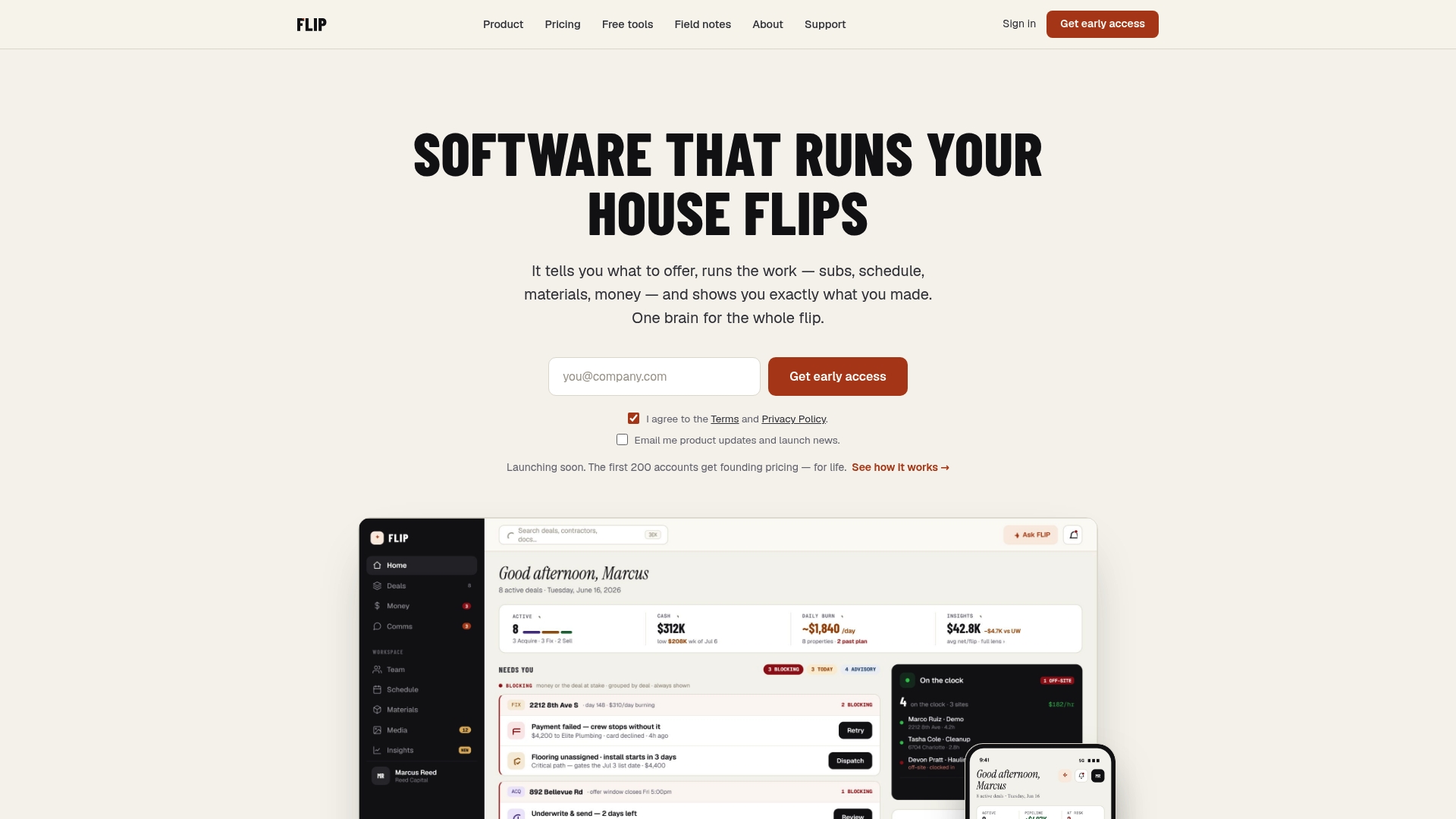
The workflow maps directly: budget and scope of work first, draw schedule next, then a pay app that requires photo verification before it routes for approval, then a lien-waiver record linked to that same pay app. Contractors and subs log into the same app with a phone-number login and use it to submit pay apps and upload photos, at no cost to them. The paying customer is the flipper, never the crew. Holding-cost math runs against the hard money loan calculator so draw timing and interest costs stay visible instead of surprising you at closeout.
FLIP is in early access. There is no live product to log into yet, and no public trial. Operators who want to see how the product is shaping up around this exact documentation workflow can request early access at Flip.

Sources and templates
Lien-waiver tracker structure and retention guidance draw on standard construction payment management practice and lien-waiver tracking methodology. Rehab scope, budget, and draw-schedule templates referenced above are available through FLIP’s tool pages, including the rehab scope checklist.
FAQ
What Is Construction Document Control for a Flip?
It is the practice of keeping every contract, waiver, pay app, and photo in one system of record and matching them against each other before any payment releases.
What Is Three-Way Matching in Construction Payments?
Three-way matching confirms the pay application, the schedule of values, and the executed lien waiver all agree on the amount and pay period before funds move.
What Is the Difference Between a Conditional and Unconditional Lien Waiver?
A conditional waiver takes effect only once payment clears the bank, while an unconditional waiver takes effect on signing regardless of payment status.
How Long Should a Flipper Keep Construction Project Files?
Keep complete project files for 6 to 10 years after substantial completion to cover the longest state limitation periods for lien claims and contract disputes.
How Fast Should Pay App Reviews Happen?
A 48 to 72 hour review window from submission to approval keeps draws moving without pressuring the owner into skipping the three-way match.
Does FLIP Handle Lien Waiver Tracking?
FLIP is building a lien-waiver tracker tied to photo-verified pay apps as part of its early access system of record for flip operators.
Recommended
FLIP runs the whole job — scope, subs, schedule and money on one record.