Protect Margin with a 72 Hour Change Order Process for Contractors

A change order is a written modification to a construction contract that adjusts scope, price, or schedule after work has started. The action that preserves payment is simple: log written notice the same day a change is discovered, assign it a unique tracking number, and assemble a priced change pack within 72 hours before any of that cost or labor bleeds into the base budget untracked.
TL;DR:
- Processing a change order within 72 hours, including assembly and approval, is crucial to recover costs before they impact the project budget.
- Proper documentation must include detailed scope descriptions, dates, schedule effects, and signatures to prevent rejection or delays.
- Using a shared, timestamped change log and software tools helps ensure visibility, accuracy, and faster approval, reducing cash-flow risks.
- Immediate notice, separate cost tracking, and linking all backup documentation are essential to avoid disputes and preserve entitlement.
- Regularly training personnel on change order procedures and establishing a clear communication rhythm minimize errors and improve project financial health.
Table of Contents
- What Is the Change Order Process, and How Do PCO, COR, and CCD Differ?
- What Situations Typically Trigger a Change Order?
- The Six Elements Every Change Order Needs
- The 72-Hour Change Pack: A Field Workflow That Protects Margin
- How Do You Price a Change Order and Justify the Time Impact?
- Approval, Documentation, and Tracking: The Governance Layer
- Where Change Orders Turn Into Disputes, and How to Prevent It
- Communicating Change Orders Across the Job
- How Are Change Order Disputes Resolved?
- Where Software Fits in the Change Order Process
- How Change Orders Affect Overall Project Risk
- Training Personnel on Change Order Management
- FLIP: An Operations Layer That Holds the Change Pack Together
- FAQ
What Is the Change Order Process, and How Do PCO, COR, and CCD Differ?
The change order process runs on a chain of documents, and each one carries different legal weight. Confusing them costs money.
A change order (CO) is the executed, bilateral modification to the contract. It changes price, schedule, or scope, and both parties sign it. Nothing about a CO is informal.
A potential change order (PCO) is the internal flag raised the moment a change is discovered, whether that’s a field superintendent finding rot behind a wall or an owner asking for a different tile. A PCO has no cost attached yet. It’s a placeholder with a number, a date, and a description.
A change order request (COR), sometimes called a proposed change order, is the priced version of the PCO. It’s what a contractor submits to the owner or GC for approval before work proceeds. This is the document that gets negotiated.
A construction change directive (CCD), under AIA terminology, or an “interim directive” under ConsensusDocs language, is a unilateral order to proceed with work before price is agreed. Owners use it when schedule pressure won’t wait for negotiation.
The distinctions matter because standard contract forms tie entitlement and notice deadlines to them:
- AIA A201 requires timely written notice before a claim for additional cost or time is considered valid.
- ConsensusDocs forms carry parallel notice provisions, often with tighter windows.
- A PCO without written notice inside the contract’s window can lose entitlement entirely, even if the work was legitimately outside scope.
- A CCD lets work continue under an NTE (not to exceed) cap while price gets sorted out later.
Every contractor should know which document applies before the crew touches anything outside the original scope.
What Situations Typically Trigger a Change Order?
Almost every change order traces back to one of six root causes, and classifying it correctly at discovery determines who pays and how fast.
- Owner-requested changes. The owner wants a different finish, an added room, or a design swap. Cost responsibility sits with the owner by default; pricing is usually straightforward since there’s no dispute over entitlement.
- Concealed or differing site conditions. Rot, undersized electrical panels, or soil that doesn’t match the geotechnical report. These trigger entitlement discussions fast, and photos taken before demo are the difference between getting paid and eating the cost.
- RFI-driven scope changes. A request for information exposes a gap in the drawings that requires a scope decision. The RFI response should be tied directly to the resulting COR, not treated as a separate conversation.
- Design errors or omissions. Missing details, conflicting drawings, or a spec that doesn’t match the site. Responsibility typically lands on the design team or owner, depending on the contract’s risk allocation.
- Code or regulatory changes. A new inspector requirement or updated code cycle. These are almost always billable, but documentation of the specific code citation matters for approval.
- Force majeure and market disruptions. Material price spikes, supply delays, weather events. Contract language on force majeure clauses determines whether these qualify for an equitable adjustment.
Field crews can run a two-question check at discovery: Is this outside the original scope of work? And is there a written trail showing when it was found? If both answers are yes, open a PCO. If either is no, the crew keeps working under the existing contract.
The Six Elements Every Change Order Needs
A change order that’s missing any of these six elements gets bounced back, and every bounce adds days to the approval clock while the crew either stalls or works unpaid.
- Project and contact information. Project name, contract number, and a unique CO number that ties back to its originating PCO.
- Dates. Date of notice, date of submission, and the proposed effective date. Gaps between these dates are exactly what reviewers check first.
- Detailed scope description. Specific language, not “additional electrical work.” Attach photos, drawings, or spec sheets that show exactly what changed and why.
- Schedule impact. State the number of days added or saved, and reference the schedule it affects, whether that’s a simple bar chart or a full critical-path schedule.
- Cost summary and updated contract value. Break out labor, material, equipment, and markup, then show the new total contract sum, not just the delta.
- Signatures and Schedule of Values placement. Both parties sign, and the approved amount gets inserted into the SOV as its own line item before the next pay application.
Industry guidance from Procore identifies these same six components as the baseline every change order should carry before it moves for approval.
Pro Tip: Build a one-page change order template in advance and keep it loaded on every job. Filling in six fields under time pressure beats drafting a document from scratch while the sub is standing there waiting on a decision.
Skip the SOV step and the math breaks on the next pay application. The contract value on paper won’t match what’s actually owed, and that mismatch is where owners start asking hard questions about billing accuracy.
The 72-Hour Change Pack: A Field Workflow That Protects Margin
Speed is the entire game here. A change discovered on Monday and priced by Thursday gets paid. A change discovered on Monday and priced whenever someone gets around to it gets absorbed into the base budget, unrecovered, gone.
Here’s the sequence that field-tested change order management runs on:
- Same-day notice and PCO assignment. The moment a change is found, whoever found it writes it down: date, location, description, and a PCO number. No PCO number, no tracking, no paper trail if it goes to dispute later.
- Assemble the change pack within 72 hours. This is a one-page document containing the PCO ID, the written direction trail (who told whom to proceed and when), field photos, measured scope, a cost estimate, and the schedule impact.
- Submit as a formal COR. The priced change pack becomes the COR that goes to the GC or owner for review.
- Price within 7 days or escalate. If a COR sits unpriced or unapproved past seven days, it goes to a designated decision maker instead of drifting in someone’s inbox.
- Run weekly change-control gates. A standing weekly meeting, even 15 minutes, where every open PCO and COR gets a status check: priced, submitted, approved, or stalled.
- Insert into SOV and pay application once approved. The approved dollar amount becomes its own SOV line before it shows up on the draw request.
Guidance from Archdesk’s construction industry research backs this exact sequence: a same-day PCO log paired with a 72-hour pricing window is what keeps recoverable dollars from getting swallowed into overhead.
When schedule pressure won’t allow time to negotiate price first, a CCD or interim directive lets work continue under a not-to-exceed (NTE) cap. That protects the owner from an open-ended bill while letting the crew move. If a CCD is issued, daily time-and-materials tickets need a signature from a site representative every single day, not batched at the end of the week. Unsigned T&M tickets are the first thing a reviewer questions when a CCD gets converted to a final CO.
| Workflow stage | Owner of the action | Target turnaround |
|---|---|---|
| Notice and PCO assignment | Field super or PM | Same day |
| Change pack assembly | PM or estimator | 72 hours |
| COR pricing and submission | Contractor | Within 7 days |
| Approval or escalation | Owner/GC | 7 days, then escalate |
| SOV insertion | Accounting/PM | Next pay application cycle |
The Associated General Contractors of America has flagged delayed change order processing as a direct cash-flow risk, particularly for smaller contractors who don’t have the reserves to float unapproved work for months. Speed isn’t a nice-to-have here. It’s the mechanism that keeps a subcontractor solvent between draws.
How Do You Price a Change Order and Justify the Time Impact?
Pricing a change order comes down to a direct cost build-up, and reviewers can tell within seconds whether that build-up is real or padded.
Start with labor: hours times burdened rate, broken out by trade. Add materials at actual or quoted cost, not a rounded estimate. Include equipment if anything beyond hand tools is needed. Layer in subcontractor backup, meaning an actual sub quote attached to the pack, not a verbal number relayed secondhand. Then apply overhead and markup per the contract’s stated percentage, which should already be defined in the general conditions so it’s never a point of negotiation mid-project.
For repetitive or uncertain quantities, unit pricing and allowances solve a lot of friction. If the contract already carries a unit price for drywall repair per square foot, a change involving more drywall repair doesn’t need a fresh negotiation. It needs a quantity times the agreed rate.
Time-impact analysis is where most CORs fall apart under review. A vague “this will add two weeks” doesn’t hold up. What does:
- A simple day-count showing where the added activity sits relative to float in the schedule.
- Reference to the critical path: does this activity actually sit on it, or does it have slack that absorbs the delay without pushing completion?
- For anything contested or high-dollar, a full critical-path method (CPM) analysis showing before-and-after schedule logic.
What backup reviewers actually check first, in rough order: signed daily T&M tickets, dated field photos, a written sub quote, and a copy of the original RFI or design conflict that triggered the change. Missing any one of those slows approval, even when the dollar amount itself isn’t in dispute.
The Associated General Contractors of America has noted that better data collection and backup documentation is one of the clearest levers for cutting approval delays industry-wide, especially on public and larger commercial jobs where every CO faces multiple layers of review.
Approval, Documentation, and Tracking: The Governance Layer
A change order that’s priced correctly still stalls if the tracking system behind it is sloppy. The fix is a change log that every stakeholder can see and trust.
A working change log needs these fields, updated in real time rather than batched at month-end:
- PCO/COR/CO number and cross-reference
- Date of notice, date of submission, date of decision
- Status: pending, priced, submitted, approved, rejected, or disputed
- Dollar amount and cumulative contract value impact
- Schedule days added or recovered
That log feeds directly into the Schedule of Values. Every approved CO becomes its own line item in the SOV, and the running contract sum updates before the next draw request goes out. A pay application that doesn’t reflect approved change order value is either underbilling the contractor or misstating the project’s true cost position to the lender, and neither is a good outcome.
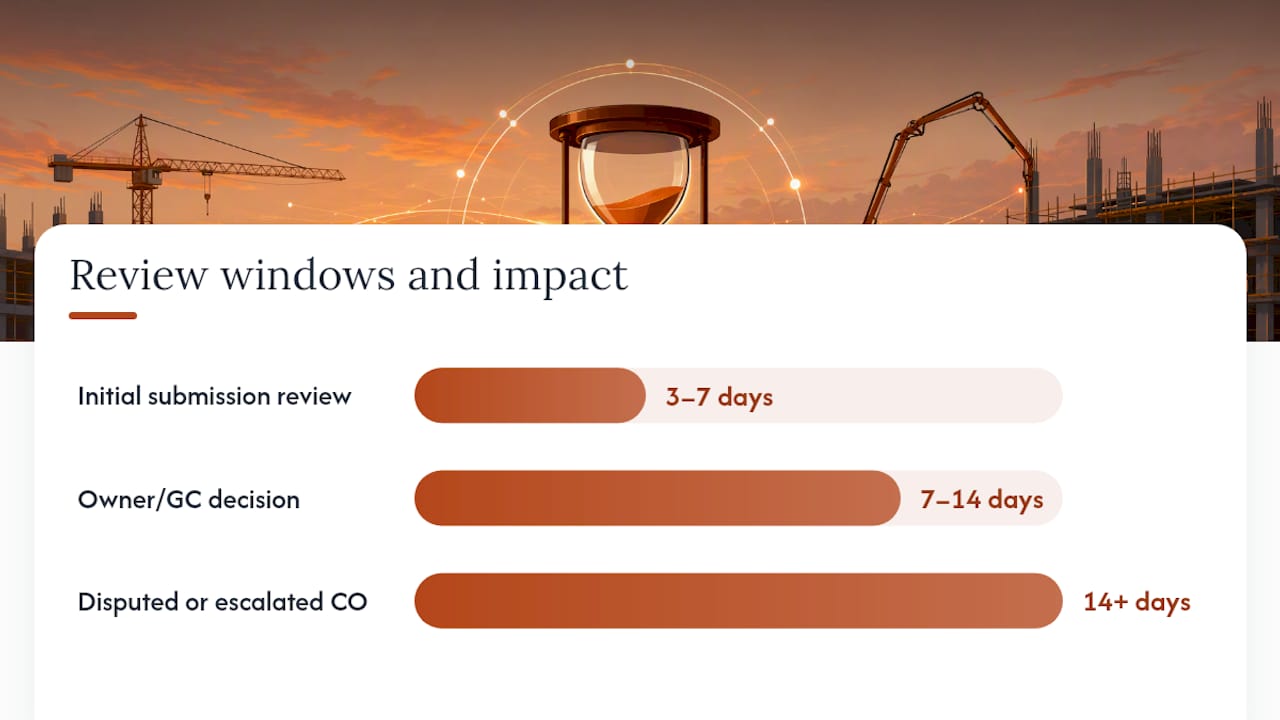
| Approval stage | Typical review window | Cash-flow consequence of delay |
|---|---|---|
| Initial submission review | 3 to 7 days | Minimal if within contract terms |
| Owner/GC decision | 7 to 14 days | Draw schedule slips one cycle |
| Disputed or escalated CO | 14+ days | Contractor floats labor and material cost unpaid |
Research from the Volpe Center under the U.S. Department of Transportation documented exactly this pattern on public infrastructure work: the longer a change order sits in review, the more it disrupts the contractor’s cash position, independent of whether it ultimately gets approved. That’s the case for treating the log as a live management tool, not paperwork filed after the fact.
Retention matters too. AIA and ConsensusDocs contract language both generally expect COs, CCDs, and their backup to be retained for the life of the project and often well beyond substantial completion, since disputes and warranty claims can surface years later.
Where Change Orders Turn Into Disputes, and How to Prevent It
Three failure modes account for most unrecovered change order dollars, and none of them are complicated to fix once they’re named.
Starting work before written authorization is the single most common reason contractors lose money on a change. A verbal “yeah, go ahead” from a superintendent isn’t notice. It’s a story two people remember differently six weeks later. Industry reporting on construction change orders points to this exact pattern as the top cause of unrecovered costs across the trade.
Missing the contract’s notice deadline. AIA A201 language typically expects notice within a defined window after the condition is discovered, commonly cited around 21 days depending on the specific clause and edition. ConsensusDocs forms often run tighter, closer to 14 days. Every contract is different. Check the actual document, not a general rule of thumb, before assuming a deadline.
Commingling change order costs with base budget costs. When labor and material for a change get logged under the same cost code as the original scope, nobody can prove after the fact what belonged to which. That ambiguity favors whoever’s negotiating from a position of doubt, which is rarely the contractor.
The mitigations are mechanical, not aspirational:
- Log notice the same day, every time, no exceptions for small changes.
- Use a separate, coded cost bucket for every open PCO so labor and material never blend into base budget numbers.
- Require a daily signed T&M ticket for any work proceeding under a CCD or before formal pricing.
- Link every RFI and submittal directly to the COR it generates, so the paper trail reads as one continuous story.
Pro Tip: When a dispute looks likely, stop negotiating informally and start building the claim file immediately: dated photos, signed tickets, the original notice, and every email referencing the change. A formal claim procedure only works if the notice was preserved from day one.
Communicating Change Orders Across the Job
A change order dies in committee more often than it dies on merit. The fix is a communication rhythm, not more emails.
The field crew that discovers a change needs one clear channel to report it, whether that’s a text to the PM, a note in a shared log, or an app entry. Ambiguity about “who do I tell” is how PCOs get delayed by days for no technical reason.
The PM or GC owns translating that field report into a priced COR and needs a defined turnaround to get it to the owner or owner’s rep. That party, in turn, needs a defined decision window instead of an open-ended “we’ll get back to you.” Tiered approval structures, where routine, low-dollar changes get faster sign-off than major scope shifts, cut negotiation time significantly on the changes that don’t actually need a committee.
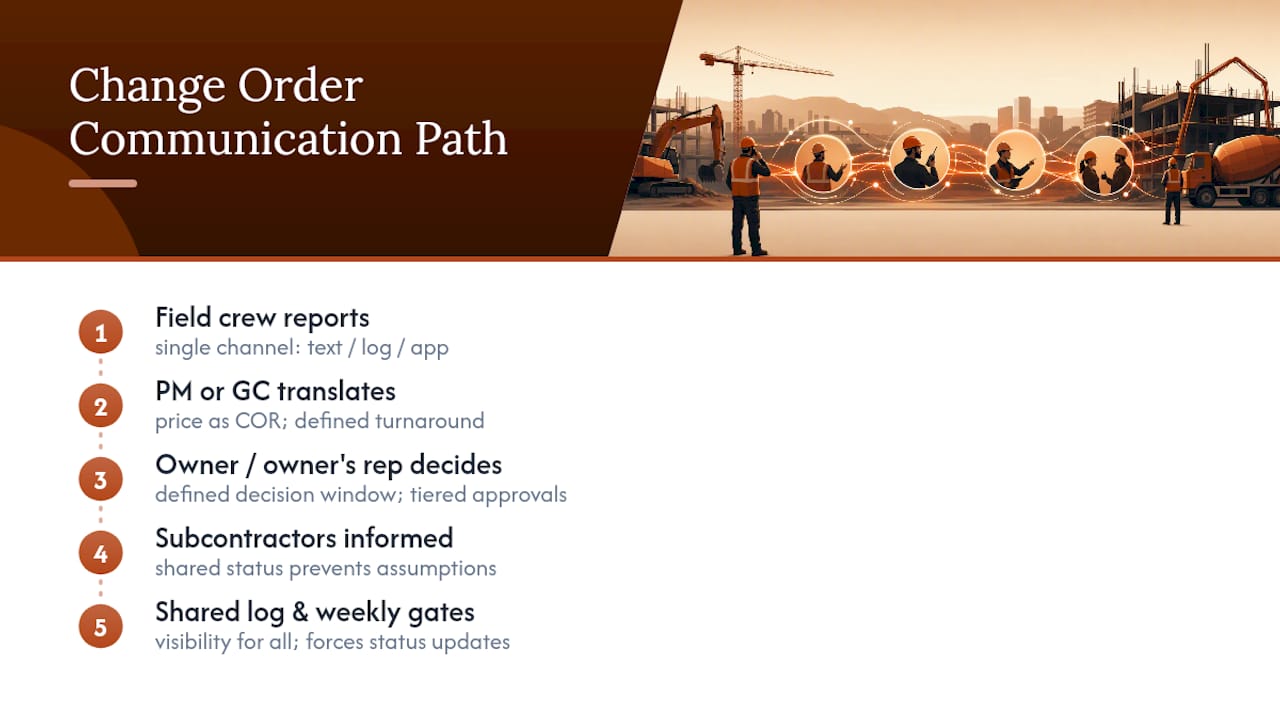
Subcontractors sit at the far end of this chain and often get the least visibility. A sub who priced a change three weeks ago and hasn’t heard anything has no way to know if it’s approved, rejected, or forgotten. That silence creates its own risk: subs start assuming approval and proceeding, which reopens the “work before authorization” problem from a different angle.
The practical fix is shared visibility, not more meetings. Everyone touching a change, from the field crew to the owner’s rep, should be able to see its current status without asking. Weekly change-control gates work because they force a status update on every open item, but the real value is the shared log behind them that anyone can check between meetings. Written status beats a phone call nobody remembers accurately.
How Are Change Order Disputes Resolved?
Most change order disagreements resolve without lawyers, but only when the paper trail is strong enough to make the outcome obvious to both sides.
The first line of resolution is direct negotiation between the contractor and owner or GC, using the change pack as the shared reference point. When both sides can look at the same photos, the same signed tickets, and the same schedule analysis, disagreement usually narrows to a specific number rather than the whole claim.
When direct negotiation stalls, most commercial contracts specify a formal claim procedure before litigation, often requiring written notice of the dispute within a set window, followed by mediation. AIA and ConsensusDocs forms both build mediation in as a required step ahead of arbitration or litigation, which keeps most disputes out of court entirely.
Arbitration comes next in most standard contracts, and it’s typically faster and less expensive than litigation, though it usually forecloses appeal. Litigation is the last resort, reserved for disputes involving larger dollar amounts, third-party claims, or a contract that specifically requires it.
What actually determines the outcome, regardless of forum, is the strength of the documentation built during the original 72-hour change pack process. A contractor with same-day notice, signed T&M tickets, and dated photos wins these disputes on paper before anyone sets foot in a mediation room. A contractor relying on memory and verbal agreements is negotiating from a weak position no matter how legitimate the underlying claim is.
Where Software Fits in the Change Order Process
Paper logs and email threads work until a job runs more than a handful of open changes at once, and then they fail predictably: someone loses track of which PCO turned into which COR, and the SOV stops matching reality.
Software built for change order tracking generally solves three specific problems: it timestamps notice automatically, so “same-day” isn’t a claim someone has to defend later; it keeps photos, quotes, and signed tickets attached to a single PCO record instead of scattered across email; and it can push an approved dollar amount directly into the SOV without a manual re-entry step where numbers get transposed.
Procore is widely used for exactly this kind of change order documentation on commercial jobs, particularly where multiple stakeholders across trades need shared visibility into status. The value isn’t the software itself. It’s that a shared, timestamped record removes the “who said what, and when” argument that fuels most disputes.
For smaller operations and residential rehab work, the same principle applies at a smaller scale: whatever system tracks changes needs to timestamp notice, hold the backup documentation, and connect the approved dollar figure to the running budget without a manual step in between. The tool matters less than the discipline it enforces.
How Change Orders Affect Overall Project Risk
Every change order is a small risk event, and a project with a high volume of unmanaged change orders is a project with compounding risk across budget, schedule, and relationship all at once.
Budget risk is the most direct. Each unpriced or slow-approved change is cash the contractor floats without certainty of recovery. Stack enough of those and a profitable contract turns into a cash-flow problem regardless of the final margin on paper.
Schedule risk compounds quietly. A change that adds three days rarely delays the project by exactly three days, because that activity interacts with trade sequencing, material lead times, and crew availability elsewhere on the schedule. Time-impact analysis exists precisely to catch that compounding effect before it surprises everyone at the finish line.
Relationship risk is the least discussed but often the most costly long-term. A GC or owner who’s been burned by change order disputes on one job brings that skepticism into the next negotiation, the next bid, the next contract. Clean change order documentation on one project becomes leverage, or at least goodwill, on the next.
The Volpe DOT research on public infrastructure change orders found that processing delays weren’t just an administrative headache. They actively disrupted contractor cash flow and, by extension, the contractor’s ability to staff and schedule the rest of the project correctly. That’s the throughline: a poorly managed change order process doesn’t stay contained to the change. It leaks into every other risk category the project is already carrying.
Training Personnel on Change Order Management
The 72-hour change pack workflow only works if everyone who might discover a change knows the first step, and that’s a training gap on most jobs, not a process gap.
Field supervisors and foremen need to know one thing cold: the moment something looks outside scope, write it down with a date and get it into the PCO log before the crew proceeds. That’s a five-minute training point, but it’s the single highest-leverage lesson on the entire list, because notice timing is what determines entitlement more than any other factor.
Project managers and estimators need training on the pricing side: how to build direct cost backup that survives review, how to attach a defensible schedule impact instead of a guess, and how to run the weekly change-control gate so nothing sits stalled past seven days without someone flagging it.
Owners and their reps benefit from training on the decision side, specifically on tiered approval thresholds so a $400 change doesn’t require the same review cycle as a $40,000 one. That single distinction, built into a defined approval matrix, cuts negotiation time on the routine changes that make up most of a typical change log.
New hires and subcontractors, who often move between GCs with different systems, need a fast orientation to whatever log or app that specific job uses. A sub who doesn’t know where to submit a signed T&M ticket will default to a text message or a verbal handoff, and that’s exactly the gap that turns into an unrecovered cost three weeks later.
FLIP: An Operations Layer That Holds the Change Pack Together
FLIP is built for flippers running rehab projects where every change order eats directly into ARV math and the spread between purchase price and resale. A missed change order on a flip doesn’t get absorbed into a large commercial contingency line. It comes straight off the bottom of the deal.

Software tools can let a flipper log a PCO the moment it’s found in the field, attach photos and a measured scope, and build the priced change pack without switching between a text thread, a spreadsheet, and a separate accounting tool. Cost changes can insert into the Schedule of Values automatically, so the running budget reflects reality instead of the original underwriting. Subcontractors log in through the same app, using phone-number login, and can submit signed daily tickets and photo-verified work directly against the job. That single record is what makes the 72-hour change pack workflow enforceable instead of aspirational.
FLIP is pre-launch. It exists because the founders needed exactly this operations layer running rehab jobs at Ugly Duckling Houses in Southeast Wisconsin, and it’s available now through early access. Before that, check how a change might move the math on a deal using the holding cost calculator, or pull the rehab scope checklist to scope the job tightly enough that fewer changes surface in the first place. For a full look at what the product covers end to end, from comps through draw approval, that’s the place to start.
FAQ
Who Prepares a Change Order?
The contractor or subcontractor who discovers the change typically prepares the priced change order request, then the owner, GC, or owner’s representative reviews and approves it before it becomes an executed change order.
What Is the Difference Between an RFI and a Change Order?
An RFI (request for information) asks a question to clarify design intent or resolve a conflict in the drawings, while a change order is the priced, executed document that modifies the contract once that RFI response reveals a scope, cost, or schedule change.
What Happens After a Change Order Is Approved?
Once approved, the change order’s dollar amount gets inserted as a new line item in the Schedule of Values, the total contract sum updates, and the amount flows into the next pay application for billing.
Does a Change Order Need to Be Signed?
Yes. A change order is only enforceable once both the contractor and the owner or GC sign it; a construction change directive can authorize work without a signed price agreement, but it requires an NTE cap and daily signed T&M tickets to preserve reimbursement.
Recommended
FLIP runs the whole job — scope, subs, schedule and money on one record.